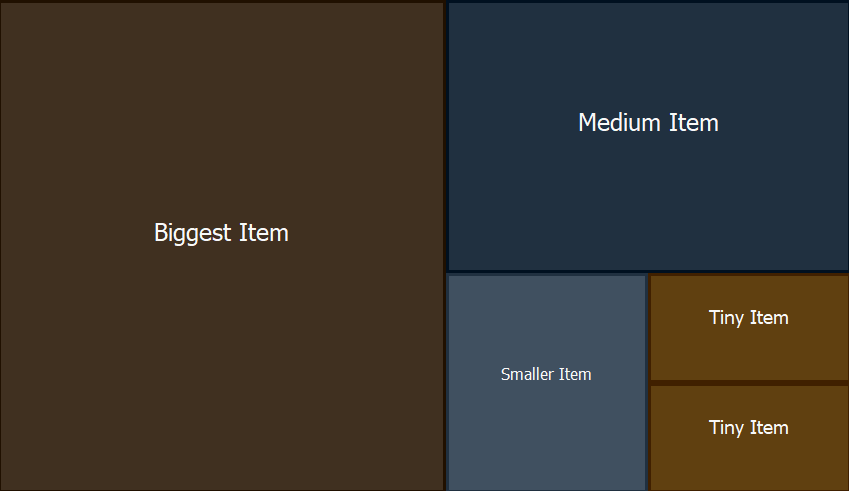
TTreeMap is a Delphi/VCL component that layouts and renders are list of items using the squarified treemap algorithm. This algorithm takes a list of items and associated weights and will layout them on a 2d-surface as a set of rectangles. The rectangles reflect the relative weight compared to all items while the layouter tries to maintain the aspect-ratios of those rectangles to be "squarish".
It has decent performance, is customizable, provides mouse-interaction and selection. The component is self-contained within one Delphi unit and does not require 3rd party libraries.
The layouter is based on this paper: https://vanwijk.win.tue.nl/stm.pdf
While the paper does a good job at explaining the idea and individual steps of the algorithm, the pseudocode and equations - especially the one to calculate the squariness - seem totally broken to me.
There are two ways to install the component:
Package-Based: Doubleclick on the corresponding .dpk-file to open the package in Delphi. Here, right-click on the package-root and then hit "install"
No-Install: Since the component comes in a single file, you can aswell just drop it into your projects folder or search path and use it from there
If you have installed the package, you can simply drag the TreeMap component onto your form and you're ready.
If you prefer to instantiate the component from code:
    MyTreeMap := TTreeMap.Create(self);
    MyTreeMap.Parent:= self;
There is no item-editor available from the IDE, but adding items is simple too:
    var Item: TTreeMapItem;
    begin
        Item:= TTreeMapItem.Create(100,'Item 1');
        MyTreeMap.Items.Add(Item);
    end;
The constructor for TTreeMapItem has two mandatory parameters:
Optional Parameters are:
Full example:
TTreeMapItem.Create(10,'Biggest Item',$203040,$f8f8f8,nil)
If you are adding huge numbers of items you might want to prevent a redraw until all items are added. In such cases, enclose your Add/Remove calls with BeginUpdate and EndUpdate calls, just like you know them from TListBox and other components.
The component has a default item-painter that uses the item's properties aswell as component-properties to paint individual-items. The component-properties for styling look like this:
    MyTreeMap.BorderSize:= 4;
    MyTreeMap.BackgroundColor:= clBlue;
    MyTreeMap.SelectionColor:= clYellow;
Just like you used to know from standard components like TListView, this component also has "custom-draw" capabilities. While doing all the painting yourself is a bit involved, the interface looks quite simple:
...
    MyTreeMap.OnDraw:= self.CustomDrawItem;
end;


procedure TForm1.CustomDrawItem(
    Sender: TObject;                // the instance of TTreeMap that requests drawing
    Canvas: TCanvas;                // the canvas on which to draw the item
    Item: TTreeMapItem;             // the item to be drawn
    State: TTreeMapItemStates;      // the items's state: hover, selected
    var Area: TRect                 // the rect in which the item is to be drawn
);
begin
    ...
Notice that the Area parameter is var! If your items are "nested" (i.e. top-level items have children) you might want to draw the "parent-item" as a thin title-bar whereas all children should be drawn in the remaining area. So when your item has children and you want to have them drawn aswell, leave the remaining space in Area. If you don't want to have children layouted and drawn, set Area to rect(0,0,0,0):
procedure TForm1.CustomDrawItem(
    Sender: TObject;
    Canvas: TCanvas;
    Item: TTreeMapItem;
    State: TTreeMapItemStates;
    var Area: TRect
);
const
    titleBarSize = 48;
var
    paintOnThisArea: TRect;
begin
    if not(Item.HasChildren) then begin
        // use the entire area if there are no children
        paintOnThisArea:= area;
        area:= rect(0,0,0,0);
    end else begin
        // but if we plan to draw children, divide the space
        paintOnThisArea:= rect(
            area.Left,
            area.Top,
            area.Right,
            area.Bottom - titleBarSize,
        )


        area:= rect(
            area.Left,
            area.Top + titleBarSize,
            area.Right,
            area.Bottom,
        )
    end;
    ...
simple demo that shows the shortest possible usage of the Treemap-Componentshowcasedemo that does a bit more: mouse-interaction, nested TreeMaps and rendering to bitmaps